How to Create a WiFi QR Code (Let Users Join Your Network Without Typing)
A WiFi QR code lets someone join your wireless network by scanning, no manual SSID or password entry. It’s perfect for guest access at home, cafés, events, and offices.
Technically, a WiFi QR code is just a QR that encodes a text payload like:
WIFI:T:WPA;S:MyWiFi;P:mypassword;;
1) The WiFi QR Format (What the QR Code Must Contain)
The widely supported WiFi payload format is:
WIFI:T:<AUTH>;S:<SSID>;P:<PASSWORD>;H:<true/false>;;- T = authentication type:
WPA,WEP, ornopass - S = your WiFi name (SSID)
- P = your WiFi password (omit if
nopass) - H = hidden SSID (optional): set
trueif the network is hidden
Most modern phones recognize this format automatically and will offer to connect when scanned.
2) Install the Python Library
The qrcode package generates QR codes, and the [pil] extra installs
Pillow, which is required to render and save QR codes as PNG images.
Run the following command in Command Prompt (or your terminal) after
installing Python and ensuring it is added to your system PATH.
pip install qrcode[pil]
If you skip [pil], the library may not be able to output an image file.
3) Create the QR in Python (Minimal Script)
import qrcode

ssid = "MyWiFi"
password = "mypassword"

wifi_qr = f"WIFI:T:WPA;S:{ssid};P:{password};;"

img = qrcode.make(wifi_qr)
img.save("wifi.png")
Output: wifi.png. You can print it, show it on a screen, or embed it on a webpage.
4) Common Variations (WPA, Open WiFi, Hidden Network)
WPA / WPA2 (most common)
WIFI:T:WPA;S:MyWiFi;P:mypassword;;Open network (no password)
WIFI:T:nopass;S:GuestWiFi;;Hidden SSID
WIFI:T:WPA;S:MyHiddenWiFi;P:mypassword;H:true;;5) Tips to Avoid “Scan Works but Won’t Connect” Issues
- Match the auth type to your router settings (WPA vs WEP vs
nopass). - SSID and password are case-sensitive.
-
If your SSID includes special characters (like
;or:), consider using a simpler guest SSID. - If you change the password, regenerate the QR and replace it everywhere (print, signage, website).
6) Security Notes
- Use a guest network for any QR code displayed publicly.
- Keep private-network QR codes inside trusted areas only.
- Prefer WPA2/WPA3 when available.
Conclusion
A WiFi QR code is the fastest way to onboard guests: encode the network details once, generate the QR, and let users connect instantly with a scan.
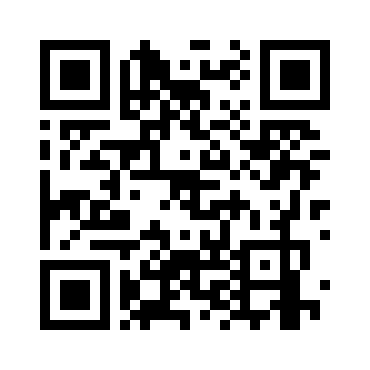
Example
WiFi details used in this example:
- SSID: MAX
- Password: 12345678


0 Comments
No comments yet, be the first!
Leave a Comment